AI can now do far beyond just answering simple questions. With its expanding skills and capabilities, it can now handle complex tasks, including bank statement analysis. For professionals in banking and lending, this is a big opportunity to review applications faster without having to spend hours on manual tasks.
But, bank statements contain sensitive data, so security must be a priority. This guide explains how to automate bank statement analysis securely with AI. You will find several methods and best practices to follow for your own workflow.
Why Bank Statements Are High-Risk Data for AI
Bank statements are official records that detail an individual’s or a business’s bank transaction history. In other words, they are confidential. Uploading bank statements into AI tools without proper safeguard steps can expose you to risks. Many AI tools store documents or data uploaded by users and use them to train their models. Therefore, before sharing any statement with an AI tool, be aware of these risks:
- Data leaks and breaches: Statements uploaded and stored on third-party servers may be exposed if service providers experience a security incident.
- Uncontrolled data retention: Your data could stay in the server long after the analysis is finished without a clear deletion process.
- Regulatory and compliance violations: Mishandling personal financial data can violate data protection laws in your jurisdiction and lead to penalties.
Methods for Analyzing Bank Statements with AI
AI technology is now accessible through many ways. Here are two main methods you can use to analyze bank statements with AI and what to consider for each.
Method 1: All-Purpose AI LLM tools (ChatGPT, Claude, Gemini)
You may already be familiar with these AI tools. Their latest models can now read documents, extract both text and numbers, and perform complex reasoning tasks. However, using this type of tools to analyze bank statements come with pros and cons you should consider.
Pros:
- Fast and easy to start: No setup or additional plugin is needed, just write your instruction and the AI will do as you command.
- Flexible: You can freely customize the prompt to get specific insights from the bank statement.
Cons:
- Data leaves your control: Your uploaded data may be stored or used to train future models, depending on the tool and your settings.
- Inconsistent accuracy: Results can vary between runs, and the model may misread figures or miss transactions, so every output still needs manual checking.
Best for: One-off analysis with masked bank statements, not for regulated financial services or sensitive borrower data.
Method 2: Specialized AI Bank Statement Analyzer Platform
AI-powered bank statement analysis automation offers a more reliable alternative to public AI LLM chat tools. Designed mainly for professional and business use, these platforms allow you to turn raw statements into structured, comprehensive financial insights within a secure workflow system.
Pros:
- Enterprise-grade data security: Platforms like AnyCheck offer data encryption, role-based access, and audit logs, with flexible deployment, on-premises or in the cloud.
- Scalability and accuracy: Automate bank statements analysis in bulk with consistently high accuracy, meaning the results stay reliable as your processing volume grows.
- Ready to use: Skip the DIY setup for prompts and models. Built-in analysis metrics cover key indicators such as average monthly balance, income stability, cash flow trends, and debt-to-income ratio, and can be adjusted to your specific needs.
Cons:
- Upfront cost: Most platforms require a subscription or an implementation fee.
Best for: Banks, lenders, fintechs, and finance teams that need to process bank statements at scale and in full compliance.
How to Automate Bank Statement Analysis Securely with AI
When it comes to using AI with sensitive documents, there are several approaches to ensure your data stays protected. This is especially important if you want to automate bank statement analysis for business processes, such as credit risk assessment, insurance underwriting, or accounting.
1. Choose the right tool
If you use a general-purpose LLM tool like ChatGPT or Claude, minimize the data you share by masking confidential account details first. If you use a purpose-built bank statement analysis automation, ask the vendor how it handles your data and what its retention policy is, and establish an NDA or data processing agreement is also an important starting point.
2. Pick the right environment
Match where the data is processed to your compliance requirements, whether in the cloud, on your own infrastructure, or in a hosting region your regulations allow.
3. Restrict access
Keep access limited to only assigned people who can process, view, or export results for further downstream use.
4. Keep a human in the loop
Review AI output against the original statement, especially totals, balances, and any figure behind a credit decision, before using it for any decision.
Why Businesses Choose AI AnyCheck Bank Statement Analyzer
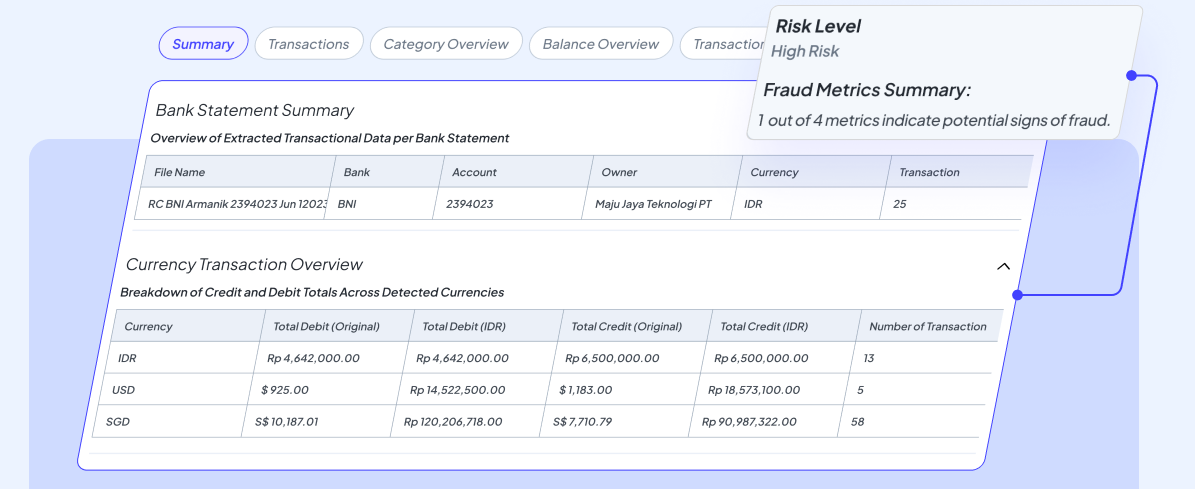
AnyCheck provides the bank statement analyzer needed to unlock financial insights from historical transaction data in minutes. Varying bank layouts, whether scanned or digital PDFs, are processed automatically without additional configuration. AnyCheck delivers a comprehensive view of each statement, covering cash flow, balance overview, transaction categorization, and fraud detection for potential tampering and suspicious activity. Large volumes of statements can be handled in bulk, so teams spend less time on manual checking and more time on decisions.
At AnyCheck, security is built into every step. All data is encrypted in transit and at rest, access is protected with role-based controls, and its information security management system is ISO 27001 certified.
FAQs
1. Is it safe to upload bank statements to ChatGPT or other AI LLM tools?
Some AI services may store uploaded files or use them to train their models. To prevent privacy and compliance issues, mask personal details before uploading. However, for sensitive borrower data, a purpose-built platform like AnyCheck with clear security controls is the safer choice.
2. What sensitive data should I be careful with before uploading a bank statement?
Personal identifiers such as names, addresses, ID numbers, and phone numbers, along with account numbers and counterparty details. Mask anything not needed for the analysis, and keep only the dates, amounts, and categories required for income and cash-flow review.
3. Can bank statement analysis be fully automated?
Yes. Data extraction, categorization, and metric calculations can be automated in one run. However, no AI automation is completely error-free. Your role in reviewing the results before use remains essential.
4. Can AI detect tampered or fake bank statements?
Yes. AnyCheck AI includes built-in fraud detection for both document forensics and transaction activity. Document forensics checks for signs of manipulation, such as altered PDF metadata, inconsistent font, or embedded images. Transaction analysis looks for red flags such as mismatched balances, duplicate or circular transactions, and unusual spending patterns.