

Financial documents contain important data for accounting, financial analysis, and business decisions. But when that information is stored in PDFs, scanned files, or long tables, manually getting the data out can take hours. It’s also easy to miss transactions or overlook important details along the way.
This is where automated data extraction comes in. For financial documents, it helps turn information from bank statements, invoices, and financial reports into structured data while reducing manual work. However, accuracy still matters, so it’s important to know how to extract and validate the data properly.
In this guide, we’ll cover best practices for accurate financial document data extraction, common errors to watch out for, and why AnyCheck by Fintelite may be the tool you’re looking for.
What Is Financial Document Data Extraction?
Financial document data extraction is the process of pulling information from documents like bank statements, invoices, and financial reports and turning it into structured data you can actually use. This means transaction dates, payment amounts, invoice numbers, and other details can be organized into rows and columns without manually copying everything into a spreadsheet.
Behind this process is Optical Character Recognition (OCR), a technology that reads text from documents, including scanned files and images. The process typically involves three steps:
- Document reading: OCR converts text in scanned documents and images into machine-readable text.
- Data extraction: Relevant fields are identified, captured, and organized, including dates, payment amounts, and line items.
- Data output: Extracted data is delivered in usable formats, such as Excel or JSON, or passed to connected systems for further processing.
Which Financial Documents Can You Extract Data From?
This approach can be applied to a wide range of financial documents, from everyday transaction records to more detailed financial and accounting documents. Here are some common document types teams automate and the information you can extract from each.
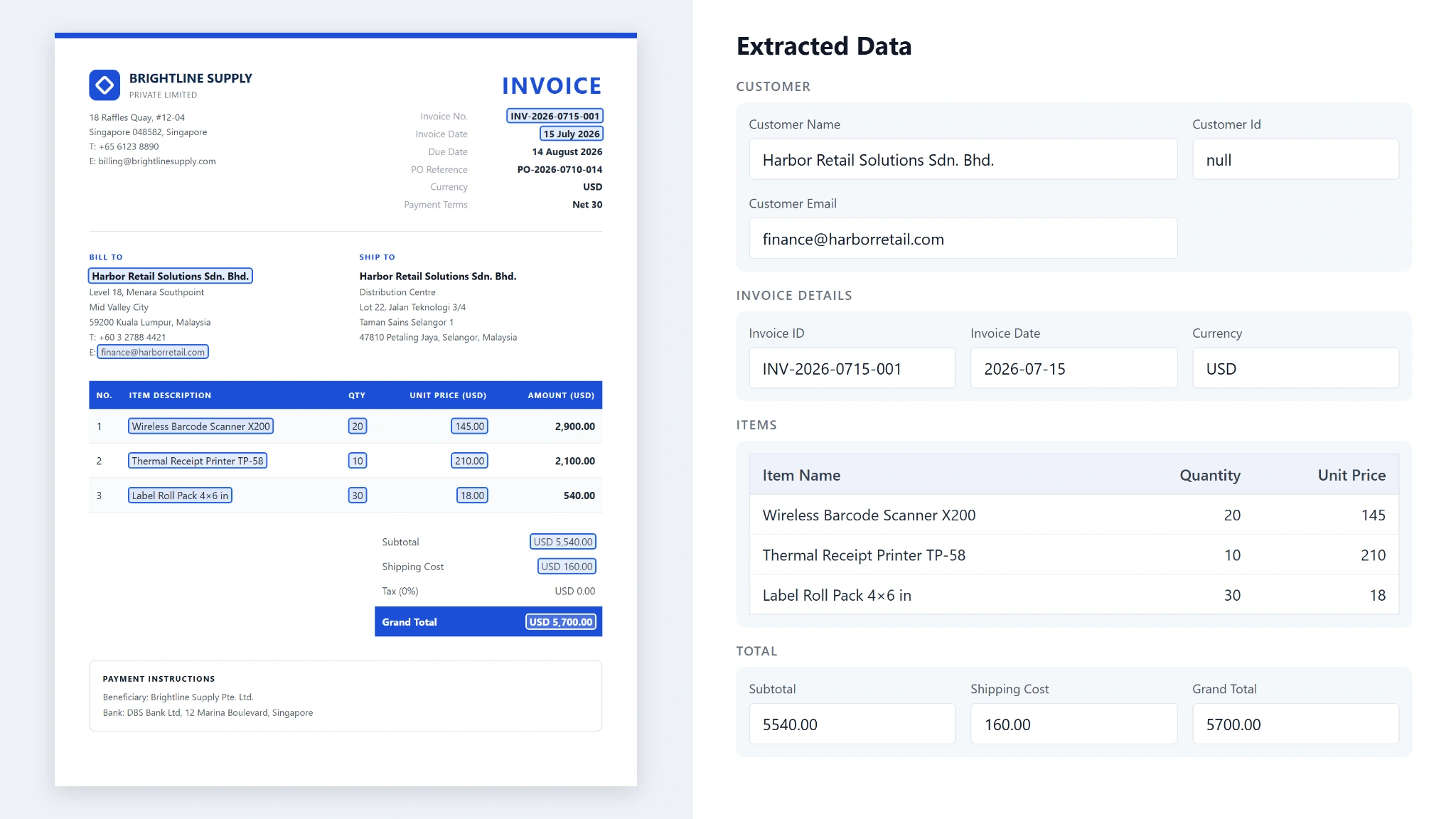
Invoices
Extractable data fields include: invoice numbers, issue dates, supplier and customer details, line items, tax amounts, payment terms, and total amounts due.
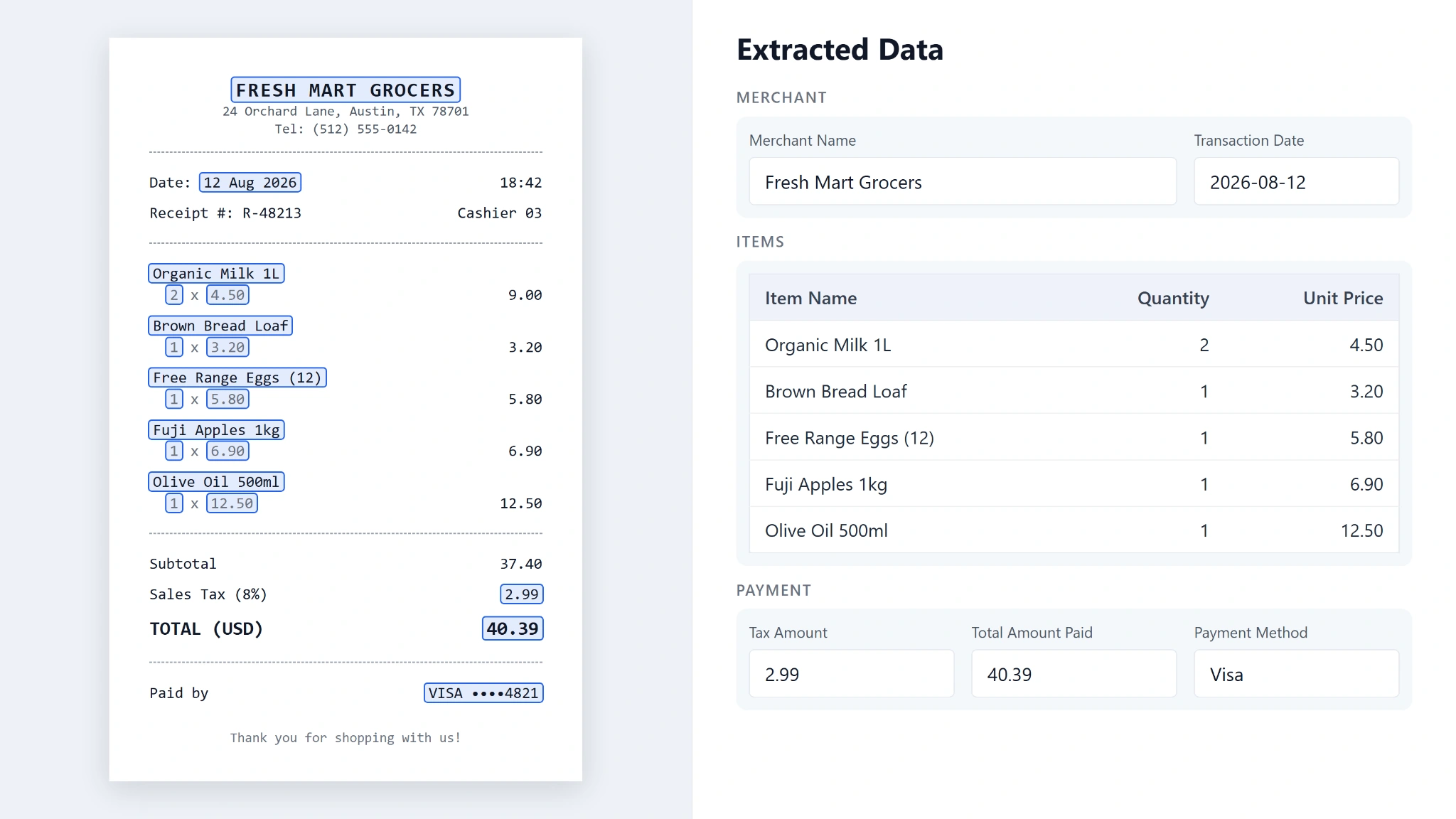
Receipts
Extractable data fields include: merchant names, transaction dates, purchased items, item prices, tax amounts, payment methods, and total amounts paid.
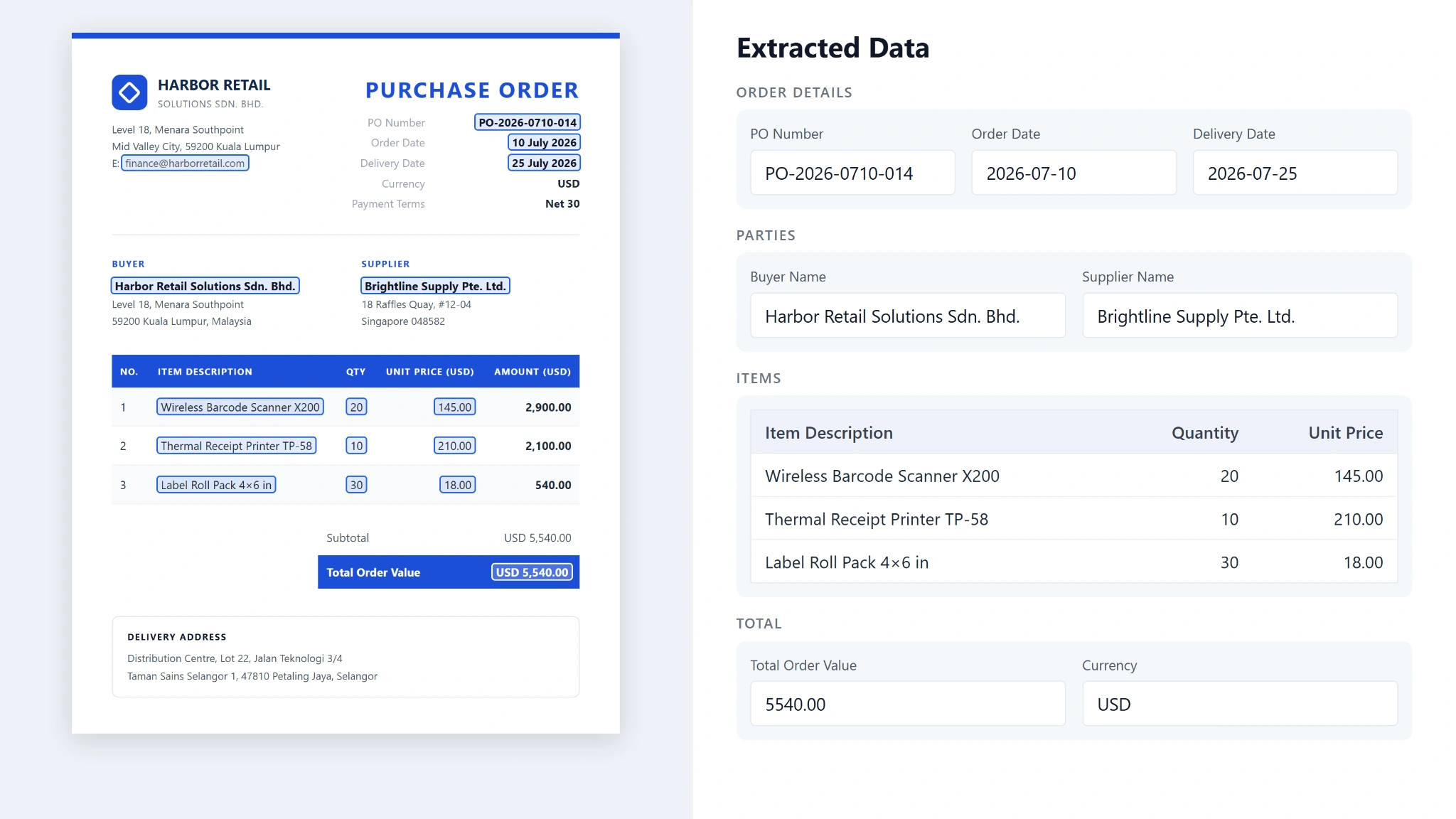
Purchase Orders
Extractable data fields include: purchase order numbers, order dates, buyer and supplier details, item descriptions, quantities, unit prices, delivery dates, and total order values.
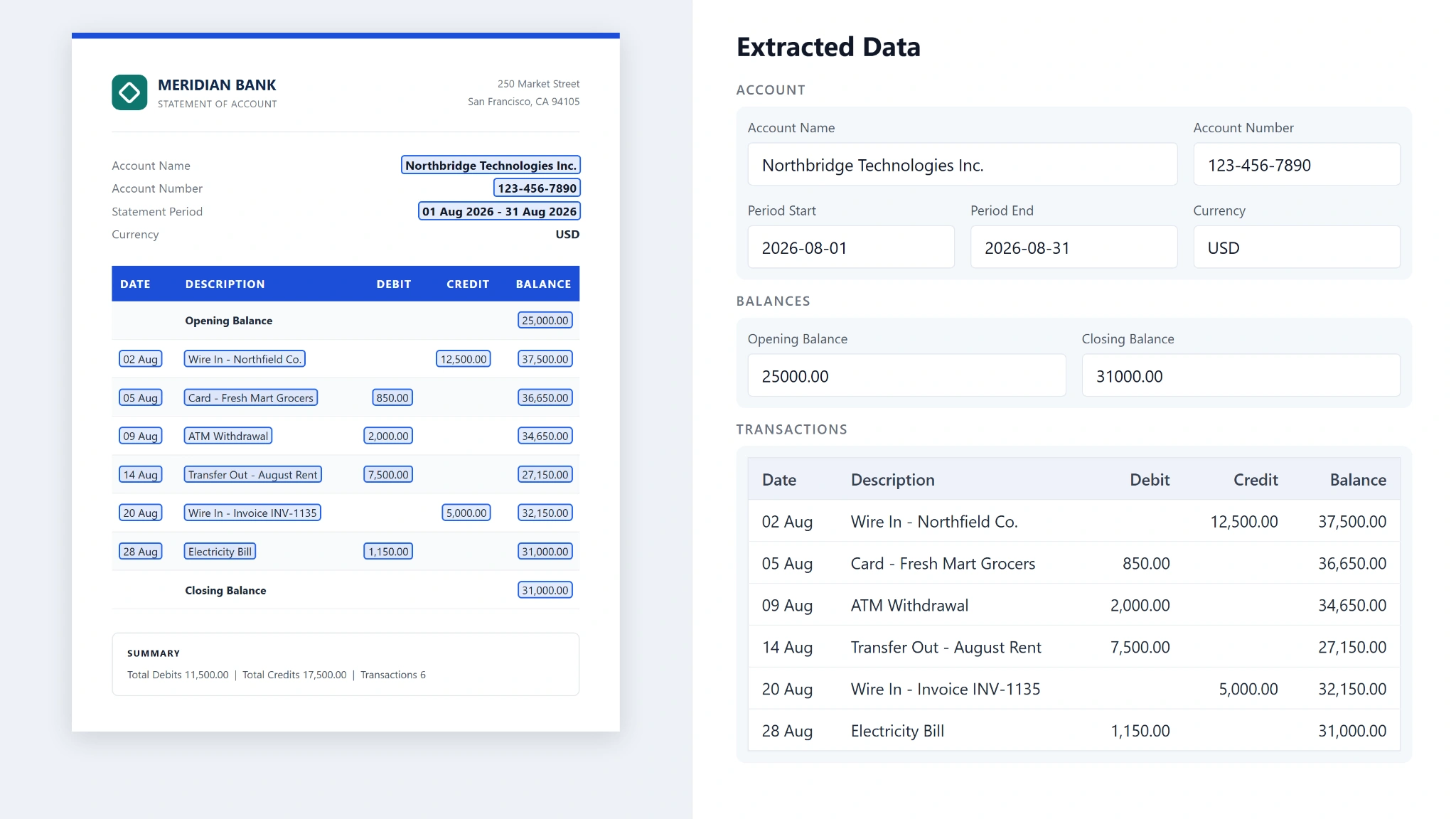
Bank Statements
Extractable data fields include: account details, statement periods, transaction dates and descriptions, debit and credit amounts, and opening, closing, and running balances.
Payslips
Extractable data fields include: employee and employer details, pay periods, basic salaries, allowances, bonuses, deductions, taxes, and net pay.
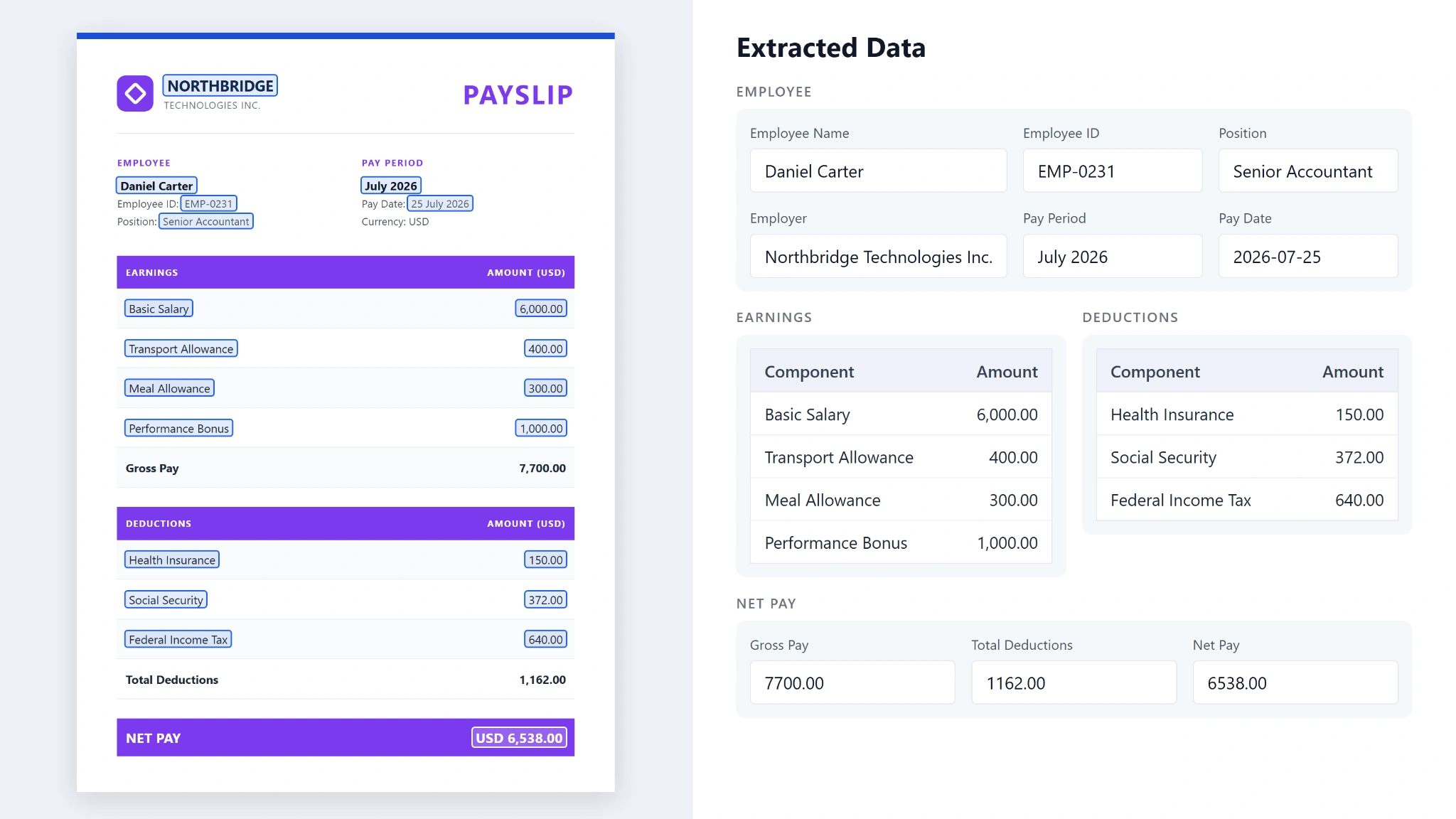
These are just some common examples. Financial document data extraction can also be applied to other documents, such as expense reports, tax forms, credit reports, and loan applications, depending on your needs.
Common Challenges in Financial Document Data Extraction
Automating financial document data extraction comes with a few challenges. Document quality, varying layouts, and differences in how financial data is presented can all affect how accurately information is captured and organized.
| Common challenge | Why it matters |
|---|---|
| Poor image quality | Blurry scans, low-resolution images, skewed pages, or faded text can make it difficult for OCR to recognize characters and numbers correctly. |
| Varying document layouts | Financial documents may organize tables, columns, and key fields differently, making it harder to identify and map information consistently. |
| Inconsistent date and number formats | Different date conventions, decimal separators, and currency formats can lead to misinterpreted values or inconsistent data. |
| Complex tables and line items | Dense tables, multi-line descriptions, and closely spaced rows can cause data to be missed or assigned to the wrong field. |
| Small extraction errors | Misread digits, misplaced decimal points, or incorrect debit and credit classifications can affect the accuracy of financial records and analysis. |
Best Practices for Accurate Financial Document Data Extraction
Accurate financial document data extraction requires the right approach at every stage, from preparing source files to validating the final output. The following best practices can help improve extraction accuracy, maintain consistent data, and reduce manual corrections.
1. Start With High-Quality Files and Image Preprocessing
Use original digital files whenever possible. For scanned documents or images, preprocessing techniques such as deskewing, noise removal, and contrast adjustment can improve text readability and help reduce OCR errors.
2. Choose the Right Extraction Method
OCR reads text from scanned files and images, while AI-powered extraction can identify and categorize fields across different layouts. Choose a method that suits your document types and data requirements.
3. Preserve Tables and Line Items
Make sure transaction rows, invoice line items, and debit and credit columns remain correctly aligned. Otherwise, extracted values may be assigned to the wrong transactions or items.
4. Define the Required Fields and Output Format
Identify the fields your workflow needs and how the results should be structured. This helps keep extracted data consistent and ready for spreadsheets, accounting software, or other systems.
5. Standardize Dates, Amounts, and Currencies
Financial documents may use different date formats, decimal separators, and currency representations. Set consistent formatting rules to prevent misinterpretation and errors during reporting or reconciliation.
6. Apply Rule-Based Validation
Use rule-based validation to check extracted data against predefined conditions. For example, verify that invoice totals match their line items, required fields are present, or bank statement balances reconcile with recorded transactions.
7. Use Human-in-the-Loop Review for Uncertain Results
Even with automated extraction and validation, some documents may contain blurry text, unusual layouts, or ambiguous values. A human-in-the-loop process sends low-confidence results and validation failures to a reviewer before the data moves further into the workflow.
How to Evaluate Financial Document Data Extraction Software
Choosing the right financial document data extraction software is more than checking whether it can read text from a PDF. Here are five questions to ask when evaluating your options.
1. Can It Handle Your Actual Financial Documents?
Test the software using documents your team regularly processes, such as bank statements, invoices, and financial reports. Check whether it can handle scanned PDFs, different layouts, and varying image quality.
2. How Accurate Is the Extracted Data?
Check whether key fields, such as transaction dates, invoice numbers, amounts, and balances, are captured correctly. You can also evaluate how much manual correction is needed to make the extracted data ready for use.
3. Can You Customize the Data Fields and Output?
Look for software that lets you define which fields to extract based on your needs and choose how the results are structured. This helps ensure the output contains the information your team needs in a usable format.
4. Does It Fit Your Existing Workflow?
Check whether the software supports the output formats and integrations your team needs, such as Excel, JSON, accounting software, or internal systems. This can reduce manual data transfers and make extracted information easier to use.
5. How Does It Protect Sensitive Financial Data?
Financial documents often contain confidential information, so review how the software stores, processes, and protects your data. Check its security measures, access controls, data retention policies, and whether its practices meet your organization's requirements.
Why Teams Choose AnyCheck by Fintelite for Automated Data Extraction
AnyCheck by Fintelite provides AI-powered OCR that helps teams extract financial data without the limitations of fixed document layouts. It supports various financial document types in multiple languages, making it easier to process different documents in one workflow. What sets AnyCheck apart from traditional data extraction tools are:
- Template-Less Data Extraction: Extract data from financial documents with different layouts without manually creating templates for each document type.
- Prompt-Based Customization: Simply define the data you need in a prompt, and AnyCheck automatically generates the extraction setup and corresponding rules.
- Additional Validation Rules: Add custom rules to check specific values, such as matching invoice totals against line items for AP or validating bank statement data during credit reviews.
See it work on your documents
Upload a document you process daily or use a sample to see how AnyCheck extracts the financial data you need.
Frequently Asked Questions
1. What Is Financial Document Data Extraction?
Financial document data extraction is the process of capturing information from documents such as bank statements, invoices, and financial reports and converting it into structured data. This makes financial information easier to review, analyze, and process without manually copying every detail.
2. How to Use OCR for Financial Data Extraction?
To use OCR for financial data extraction, upload a digital or scanned financial document to an OCR-powered tool. The software recognizes the text, identifies relevant fields, and converts the information into structured data that can be exported or processed further. Data validation may be needed to ensure accuracy.
3. How Do You Improve Financial Data Extraction Accuracy?
Use high-quality source files, choose an extraction method suited to your documents, preserve table structures, and standardize dates and number formats. Applying validation rules and reviewing uncertain results can also help reduce errors.
4. Can You Extract Financial Data From Scanned PDFs?
Yes. OCR-powered tools can extract financial data from scanned PDFs by recognizing text in document images. The accuracy depends on factors such as image quality, document layout, and the extraction technology used.
5. What Should You Look for in Financial Document Extraction Software?
Look for accurate extraction across different document layouts, customizable data fields, validation features, suitable output formats, and integrations with your existing systems. Security measures and the amount of manual correction required are also important considerations.