Paying a supplier invoice without proof that the goods actually arrived is how overpayments, duplicate bills, and supplier disputes happen. Checking every invoice by hand is slow and easy to get wrong, especially when volumes grow.
Automated 3-way matching lets software check each invoice against its purchase order and goods receipt, so only mismatches need review. For Malaysian AP teams, this replaces hours of manual document checking across spreadsheets, email threads, or paper files.
What is Automated 3-Way Matching?
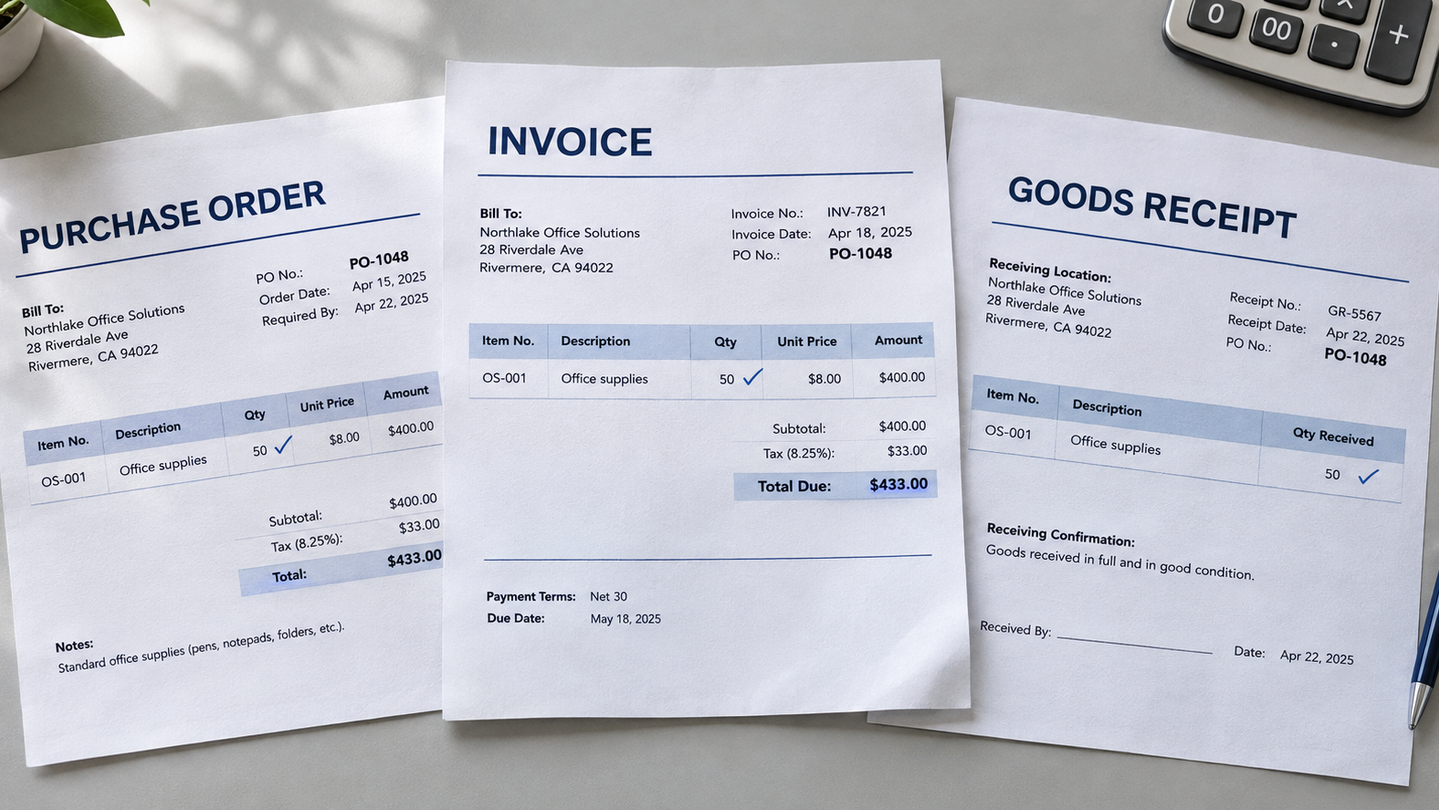
Automated 3-way matching is an accounts payable control that uses software to verify the quantities, prices, and totals across three documents before payment is made. These are the supplier invoices, purchase order (PO), the goods receipt note (GRN), which many Malaysian businesses record as a signed delivery order (DO).
Most solutions combine AI-powered OCR to capture invoice data, automated matching rules to compare each line item, and configurable tolerances. Exceptions are routed to the right person for review, with the reason attached.
Here is how this compares with manually checking invoices.
| Aspect | Manual | Automated |
|---|---|---|
| Speed | Slow, done by hand | Fast, handled by software |
| Accuracy | Prone to human error | Consistent line-by-line checks |
| Audit trail | Scattered across email and spreadsheets | Central and searchable |
| Review effort | Every invoice | Only exceptions |
| Scalability | Needs more staff | Scales without extra staff |
How Automated 3-Way Matching Works
Think of it as the same three-document check your team already runs, only faster and automated. The software collects the invoice, checks it against the PO and GRN, and outputs clean data that is ready for your ERP. Here is how it works, step by step.
Extract Data
Documents from email, upload, or e-invoice are collected in one place. AI-powered OCR then reads the PO, GRN, and invoice, capturing supplier details, PO number, line items, quantities, prices, and totals, even when layouts differ.
Cross-Match Documents
Each line is checked across all three documents according to your AP team’s rules, such as whether the quantity billed matches what was received and whether the unit price matches the PO.
Flag Exceptions
Anything outside tolerance goes to the review queue with the reason for the mismatch attached. In this step you can decide whether to approve or decline.
ERP-Ready Output
Approved invoices are prepared as clean, structured data that you can easily send to your ERP. Below is an example of the output. The fields can usually be customized to match your existing setup.
Benefits of Automating Repetitive Invoice Matching
Moving from manual checks to automation changes where your AP team spends its time. Instead of repeatedly checking each incoming invoice, they can skip that step and focus on more important tasks like strategy or vendor management. These are more benefits your team can gain with automated invoice processing.
Faster Time per Invoice
Software reads and compares all three documents in seconds, so invoices reach approval sooner and payments are not held up by manual checking.
Fewer Payment Errors
Automatically catch quantity and price mismatches before payment, which helps avoid overpayments, duplicate bills, and supplier disputes.
Stronger Control and Audit Trail
An invoice without a matching PO and receipt cannot pass, and every match and exception is recorded, so you can show why each invoice was approved or held.
How to Implement Automated 3-Way Matching for Accounts Payable
Adopting automated 3-way matching does not require changes to existing procurement or receiving procedures. The software works with the purchase orders, delivery records, and invoices your team already produces, so the setup is mostly about configuration. The following steps outline the most efficient approach to getting started.
Choose the Software
Consider choosing software with built-in AI OCR that can read data from any layout, since a template for every supplier defeats the purpose of automation. Not only that, it should deliver the output in the format your team needs.
Customize Your Rules
Tailor the matching workflow to follow your AP policy. Decide which fields must match, how much difference is acceptable, and which person or team each exception is sent to.
Set Up the Output
Approved invoices are prepared as clean, structured data that is ready for your ERP. Choose how it leaves the system, such as an Excel file, JSON, or a direct integration, and run a small batch first to confirm the data lands in the right fields.
How AnyCheck Helps You Easily Automate 3-Way Matching
AnyCheck by Fintelite offers a ready-made accounts payable workflow that automatically reads your invoices, purchase orders, and goods receipts. It then cross-checks them, flags exceptions for review, and delivers approved invoices as clean data for your ERP.
It is powered by AI OCR, so documents from any supplier layout can be processed without setting up a template for each one. The 3-way matching rules are also customizable, whether you want to check that a specific field is present or confirm that quantities and prices agree across all three documents.
Frequently Asked Questions
What is 3-way matching in accounts payable?
3-way matching is an accounts payable control that compares a purchase order (PO), goods receipt note (GRN), and supplier invoice before payment is approved. The invoice is paid only when quantities, prices, and totals agree across all three documents.
What is the difference between 2-way and 3-way matching?
2-way matching compares only the PO and the invoice, so it confirms what was ordered and billed but not what arrived. 3-way matching adds the GRN as proof of delivery. It is usually used for physical goods, while 2-way matching often fits services.
Can 3-way matching be fully automated?
Most of it can. Software reads the documents, compares them line by line, and passes invoices that agree. Mismatches are flagged with the reason, so a person can review and resolve them, which keeps human judgment where it matters most.
Can automated 3-way matching handle invoices in different layouts?
Yes, if the software uses AI OCR. Basic tools often need a separate template for each supplier format, while AnyCheck with AI-powered OCR reads invoices in any layout and extracts the same fields every time, so new suppliers do not require new setup.
How does AnyCheck support 3-way matching, and can I try it?
AnyCheck by Fintelite reads POs, delivery records, and invoices in any layout without manual templates, then delivers clean, structured data as Excel, JSON, or through an API. To see how it works on your own documents, you can try it for free.