
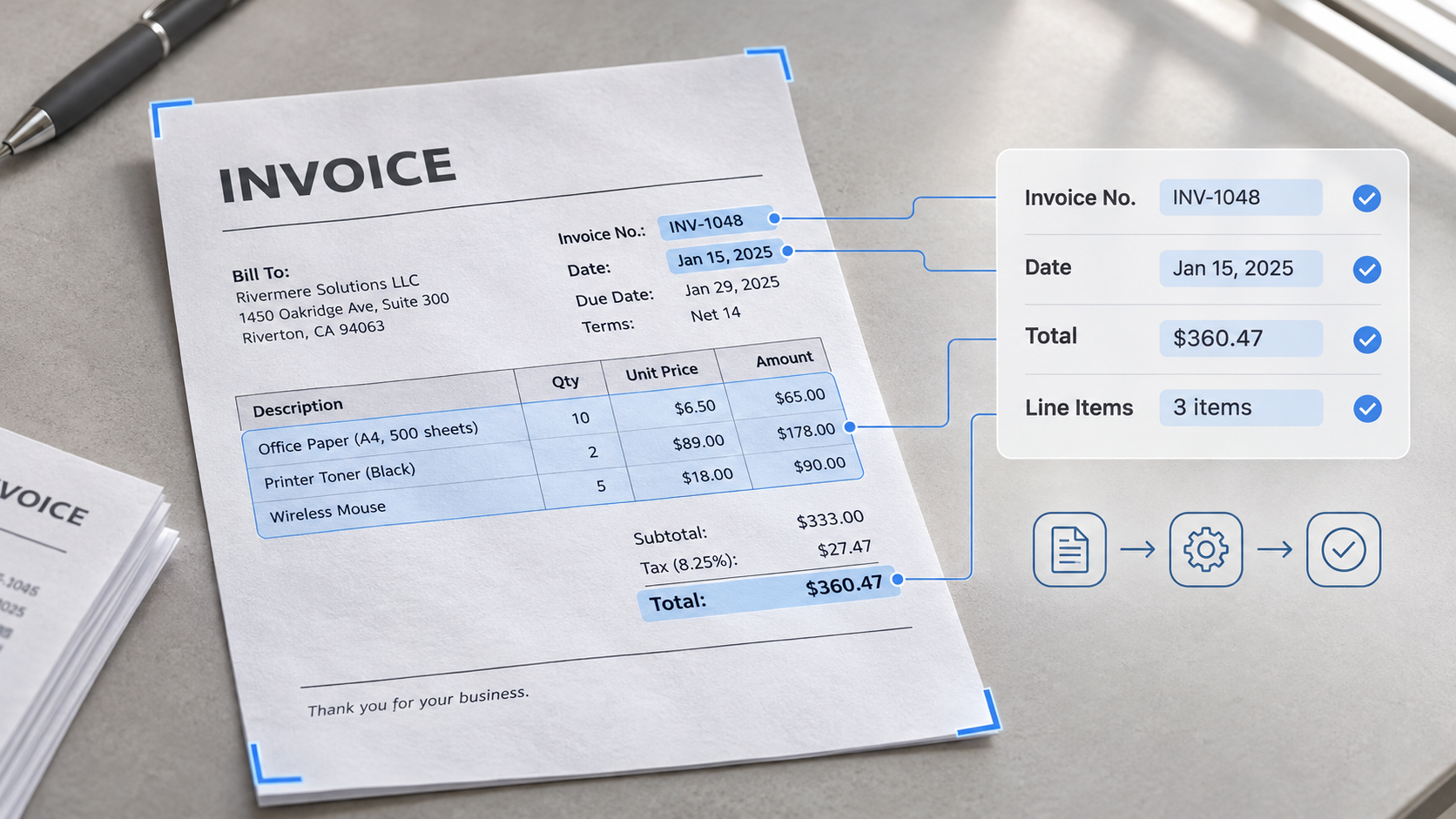
Automating the invoice processing workflow is no longer a project reserved for large companies with big IT budgets. Today, AI can read invoices in different layouts, check them against purchase orders, and flag differences automatically, which makes automation far more accessible for Singapore finance teams of any size.
This guide walks through why you should move away from manual invoice processing, how an automated invoice processing workflow works from capture to matching, and what features to look for in the tools you choose.
Why Automate Invoice Processing?
Manual invoice processing works when only a few invoices come in. As volume grows, the same steps create friction, and automation removes that friction by taking over the repetitive work, so finance teams can focus on approvals.
Here are the common manual problems that automation helps solve:
Data entry takes over the day
Typing supplier details, line items, and totals becomes a task that never ends, and mistakes can often happen.
Slow matching process
Comparing invoices with purchase orders and delivery records takes more time as volume grows, and mismatches are easy to miss.
Scattered invoices and unclear approvals
Invoices spread across inboxes, and it becomes difficult to see what is pending or why a payment is late.
What an Automated Invoice Workflow Looks Like: Step by Step
An automated invoice workflow is designed to take an invoice from arrival to ERP with as little manual work as possible. Here is what the invoice workflow looks like once AI software takes over the repetitive steps:
Step 1: Capture and Extract
Invoices are received by email or uploaded as PDFs, scans, or photos. Automated data extraction starts by capturing the key fields, such as supplier name, invoice number, dates, line items, tax, and totals, and turns them into structured data. The same applies to supporting documents such as purchase orders and delivery receipts, so everything needed for matching is ready in one place.
Step 2: Validate and Match
The software checks the extracted data for errors, such as totals that do not add up or missing details. 3-way matching then runs automatically, checking the invoice against the purchase order and delivery record and flagging any differences. Because every flagged difference is shown with the reason, your team can see right away what to follow up with the supplier.
Step 3: Route Approvals and Exceptions
The software sends invoices that pass the checks to the right approver. Invoices with differences go to an exception queue for review, and your team can see what is pending at any point. Approvers get a clean invoice with the data already checked, so they can approve with confidence instead of verifying the numbers themselves.
Step 4: Send Data to Your ERP
Once approved, the invoice data is prepared in the format your ERP or accounting software expects, so it can be imported without re-keying. Your team then posts and pays the invoice as usual, with the original document available for reference.
Key Features to Look for in Invoice Processing Automation
The way invoices are handled can differ from one business to another, and the right tool should be able to accommodate how your team actually works. Here are the key features to look for when choosing an invoice processing automation tool:
Multi-layout data extraction
Reads invoices from different suppliers, including PDFs, scans, and photos, and captures line items, not only the header details.
Cross-document validation
Compares the invoice with the purchase order (2-way), and with the delivery record as well (3-way), and flags any differences.
Configurable approval routing
Lets you set where each invoice goes, such as by amount or supplier, so it reaches the right approver and mismatches go to a review queue.
ERP-ready output
Approved data should come out in the format your ERP or accounting software expects, such as Excel, CSV, or JSON, so your team can import it without additional manual effort.
Things to Consider for Singapore Businesses
Invoice processing works in a similar way in most places, but a few points are specific to Singapore. Keeping them in mind helps you choose an invoice processing automation that fits local requirements and the way Singapore suppliers send invoices:
GST details
A valid tax invoice is needed to claim GST input tax, and missing or incomplete details can stop a claim. The tool should capture details such as the supplier’s GST registration number, the invoice date, and the tax amount accurately, and flag invoices where something is missing so they can be corrected before posting.
Mixed invoice formats
Suppliers in Singapore range from large companies to small businesses, so invoices can arrive as PDFs, scans, or photos. Choose a tool that reads all of them reliably, and test it with your own suppliers’ invoices, not only clean samples.
Foreign currency invoices
Many Singapore businesses buy from suppliers overseas, so some invoices may be in other currencies. The tool should capture the currency and amounts correctly, so your team can review and post them without confusion.
Record keeping
Keep the original invoice together with its extracted data, so invoices can be found quickly for audits or supplier questions. Check IRAS guidance on how long records must be kept.
Frequently Asked Questions
What is invoice processing automation?
Invoice processing automation uses software to capture invoices, extract their data, check and match them against purchase orders and delivery records, route them for approval, and prepare the data for your ERP. It reduces manual data entry, so your team can focus on exceptions and approvals.
Can invoice automation read scanned or photographed invoices?
Yes, most tools can read PDFs, scans, and photos, not only digital invoices. Results depend on the tool and the quality of the document, so it is best to test it with your own suppliers’ invoices before rolling it out.
Do I still need people to review invoices?
Yes. Automation handles the repetitive work, such as reading, checking, and matching. Your team still reviews flagged exceptions and makes the final approval, so decisions stay with people.
Can invoice processing automation handle 3-way matching too?
Yes. 3-way matching compares the invoice with the purchase order and the delivery record before payment. Tools with cross-document validation can check these documents line by line and flag differences in items, quantities, or prices, so your team reviews only the exceptions instead of matching documents by hand.
How long does it take to set up invoice processing automation?
It depends on the approach. Building an in-house solution can take a long time, since it requires development, testing, and maintenance. AnyCheck offers a ready-to-use automated invoice workflow that can still be configured to your needs, including your validation rules, so your team can start with its own invoices quickly.